![Inven logo.png]](https://help.inven.ai/hs-fs/hubfs/Inven%20logo.png?height=40&name=Inven%20logo.png)
You can now connect your CRM with Inven! This new feature allows you to effortlessly track which companies you've previously interacted with and identify potential new deals.
How the CRM integrations work
- Sync your CRM for seamless workflows.
- Filter out companies already in your CRM.
- Identify new opportunities by spotting companies you haven’t contacted yet.
Note: Currently only available for the following CRMs: Hubspot, SalesForce, Affinity, and DealCloud.
The workflow for syncing these CRMs with Inven is very similar each other. The guide below will walk you through how to set it up. Feel free to reach out if you need help!
Here's a video that explains how to easily connect and use the CRM integration (Hubspot/Salesforce):
Or, here are the simple steps to get you started:
1. Navigate to the top right corner in Inven and click on your profile Settings.
2. Ensure you've logged into your CRM on another tab.
3. Look for the your CRM logo and click on it
4. Proceed to accept the integration request on your CRM.
5. Once accepted, click on "refresh data" in Inven to sync companies in your CRM.
6. Voila! You're all set. Now, every company that is also in your CRM will be marked with a your CRM logo.
Note: Duplicates will not be created in Inven or in your CRM.
Exporting Companies to a CRM List
- Export companies directly to your CRM as a list or as individual contacts.
- Choose whether to export companies or contact details.
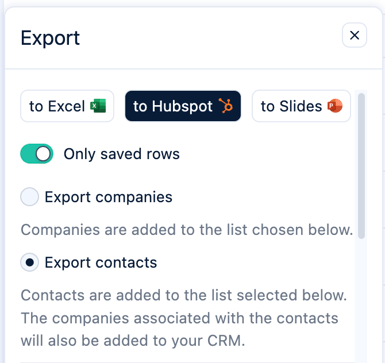
Note: The companies associated with the contacts will also be added to your CRM by selecting "Export contacts".
- Select or create a list within your CRM to export your data.
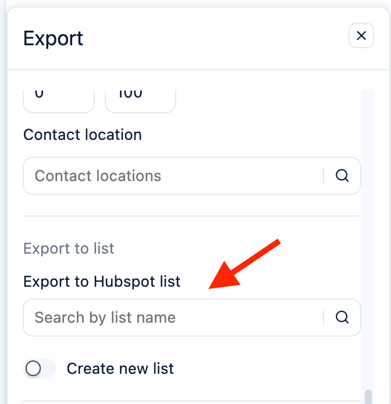
Note: Current datapoints that are exported by default are: company name, website, contact details.
Integrating with Affinity:
Integrating with DealCloud:
This integration lets you sync company data from DealCloud into Inven through your own API — helping you quickly identify new, untapped opportunities.
You can now exclude companies that already exist in your CRM with just one click. This makes it easier to find fresh opportunities your team hasn’t engaged with before.
The DealCloud integration can be found via your Settings > Click on DealCloud > add your DealCloud credentials:
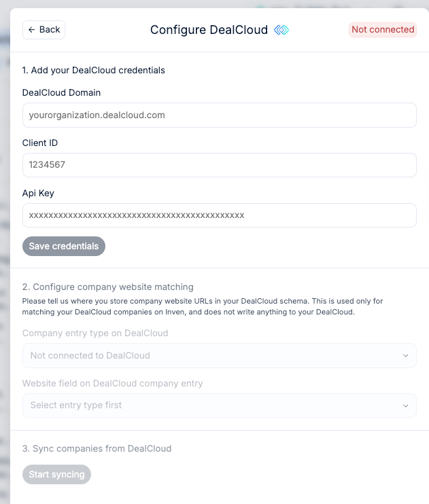
How the integration helps you
- One-way integration: Data flows from DealCloud to Inven, allowing Inven to recognize which companies already exist in your CRM.
- Smarter search: Exclude companies already in your CRM with one click and instantly get a list of new, untapped opportunities.
- Guided setup: Our Customer Success team can help you get started.
Need a CRM integration we haven't listed? Let's discuss custom API development by reaching out to your account manager or to info@inven.ai